


Family Chore Manager
4.126.00 Reviews
App Specs
- Version
- 1.7.0
- Updated On
- License
- Free
- Downloads
- 10,000+
- Developer
- Kronickel
- Categories
- Parenting
- Platform
- Android
Screenshots
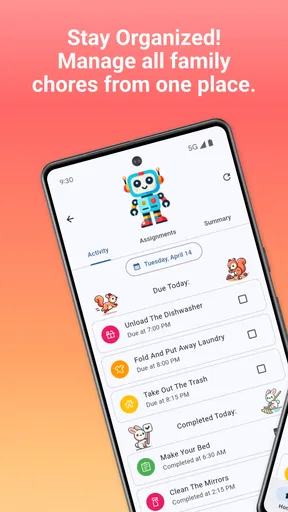
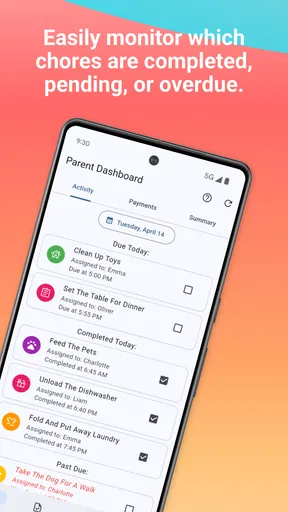
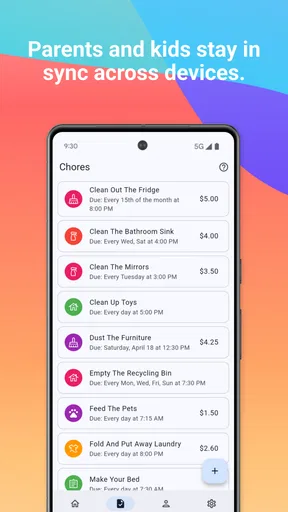
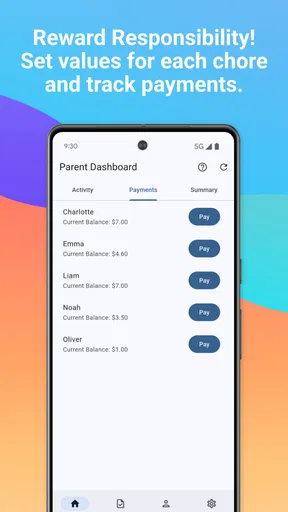
 Analysis by AppCompare
I’m cautious about family apps that put children’s routines on a screen, because a helpful chore list can also become one more thing parents have to manage. Family Chore Manager is a parenting app from Kronickel that brings chores and rewards into a shared household routine. I’d approach it as an organizer, not a substitute for a conversation about what is fair, age-appropriate, and actually needs doing. Its appeal is straightforward: make responsibilities visible and give family members a common place to follow them.
Why trust starts with the household routine
Chore apps can influence how a family divides work, so the important question is not only whether a task can be assigned. It is whether everyone understands the arrangement and can talk about changes. In my view, a digital list is most useful when it supports an agreement the family has already discussed; it can make that agreement easier to remember, but it cannot decide what counts as a fair share.
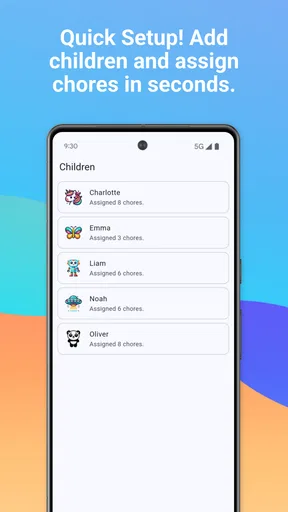
The app’s family-oriented setup, including profiles for family members and customizable avatars, gives the routine a recognizable shape. That can help younger children see that a task belongs to them rather than to an unnamed household member. Still, I would set expectations together before adding chores: explain what “finished” means, when the task should happen, and what to do if a child cannot complete it. Those small conversations prevent a checklist from turning into a source of surprise or conflict.
What the controls can—and cannot—tell you
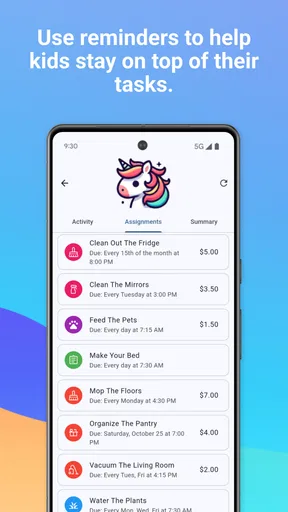
Family Chore Manager includes task assignment, progress tracking, reminders, notes, and rewards. Those are visible ways to organize the routine and coordinate within the family. They are useful controls over the household’s chore plan, but they should not be confused with controls over personal data. I would check the app’s current permission prompts and privacy information on the device before adding family details, and make choices based on what the app actually asks for rather than assumptions about what it might collect.
That distinction matters particularly when children are involved. I’d keep profile details limited to what is genuinely useful for assigning tasks, and avoid putting sensitive information into notes. A reminder such as “feed the cat after school” is practical; a note containing personal schedules or other private details is better kept elsewhere. The app’s age classification is Everyone, but that does not remove the value of a parent reviewing setup and deciding what children should see or enter.
Use rewards without letting them take over
The reward system can make routine chores feel more engaging, especially for children who respond well to a clear goal. I’d keep rewards modest and specific, such as choosing a family activity, rather than making every ordinary contribution depend on a prize. A useful approach is to agree in advance which jobs are simply part of living together and which optional tasks might earn an extra reward. That keeps the system from implying that every shared responsibility is a paid transaction.
There is also a practical trade-off: rewards need follow-through. If parents add incentives and then forget to honor them, the system can lose credibility faster than a paper chart. I’d start with a small set of chores and one reward the family can reliably deliver. Once everyone understands the rhythm, you can decide whether to add more. The app is most likely to help when its plan is simple enough that adults can maintain it during a busy week.
Worth Reading Before You Choose

Flipboard Shows What News Apps Must Do Beyond the Feed

Switching to Android Auto Means Rethinking Your Driving Routine

Google Calendar Makes a Crowded Week Easier to Manage

Ludo King Makes the Most of the Minutes Between Plans

Baby Panda World Brings Quick Play to Modern Phones, but Its Game Library Feels Busy

ESPN’s Live Game View Makes Following Close Games Easier
Where the everyday friction shows up
Digital reminders can reduce the need to repeat instructions, but they do not make a task happen by themselves. A child may miss a notification, a chore may take longer than expected, or a family plan may change. I would treat the task list as a prompt for checking in, not as proof that a person has ignored a responsibility. A quick conversation is often the better response when a task is late or unclear.
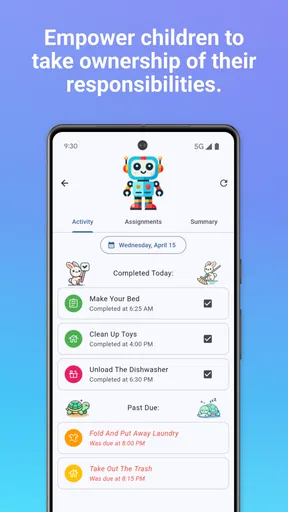
Progress views can also be useful without becoming a scoreboard. If one person appears to be doing less, the record may reflect how tasks were entered or which work is less visible, rather than the full balance of effort at home. I’d use the app’s tracking to spot questions worth discussing—such as whether a particular chore keeps being missed—rather than to settle an argument by pointing at a screen.
Choosing it over a chart or a general task app
A paper chart is still a strong alternative for families who want a visible list on the fridge, no device handoff, and no setup beyond a marker. It can be easier for very young children to understand at a glance. A general notes or calendar app can suit adults who already manage household tasks digitally, but it may require more manual work to make assignments and rewards understandable to children.
This app sits between those options: it is built around family chores and includes features aimed at assignments, progress, and incentives. That focus is helpful if your household wants those pieces together. It may be unnecessary if you only need a rotating list of a few jobs, or if everyone already checks a shared calendar reliably. I’d choose the lightest system that your family will actually keep using, rather than moving every household routine into an app by default.
A realistic way to start
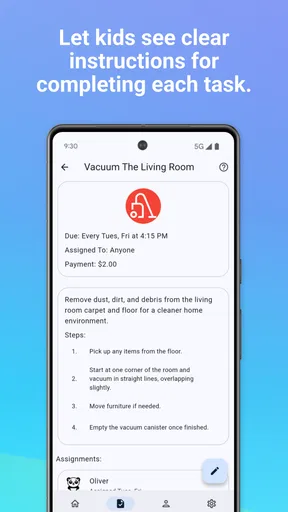
Imagine a weekday evening when one parent is preparing dinner and a child has homework after school. Instead of calling out several jobs at once, the family can use the assigned task list to make one or two responsibilities clear—perhaps setting the table before dinner and putting away dishes afterward. A note can clarify a detail such as where clean dishes go, while a reminder can help if the task is easy to forget. The useful part is not adding more notifications; it is agreeing on a sequence that fits the evening.
For a smoother first week, I’d assign chores with clear endpoints and avoid vague entries such as “help out.” “Put folded towels in the hall cupboard” is easier to check than “tidy up.” I’d also avoid assigning tasks based only on who is available at one particular moment: schoolwork, fatigue, and changing plans matter. After a few days, ask each family member which task felt unclear or unfair, then adjust the routine together. That small review makes the app serve the family instead of making the family serve the checklist.
Cost, access, and who should consider it
The app is free to download, with in-app purchases listed from $3.99 to $19.99 per item. I’d begin with the free experience and decide whether any paid option is worthwhile only after the family has tried the routine. That avoids paying for features before you know whether children will engage or whether parents are willing to maintain the assignments. Family Chore Manager has a 4.0 average from around 96 ratings and over 10K installs, which suggests it has found an audience, but those figures cannot predict whether it fits a particular household.
It was released on October 28, 2024, and version 1.6.1 requires Android 7.0 or later. Those details are worth checking against the device you plan to use, especially if an older phone or tablet is intended for a child. The app is best suited to parents who want a dedicated family chore space, are comfortable reviewing app permissions and privacy choices, and can agree on a consistent routine. I’d skip it if your family prefers not to manage children’s responsibilities through a device, if a simple paper chart already works, or if adding another notification source would increase stress.
One decision I would make before inviting children into the routine is who gets to change assignments and rewards. The family needs a shared understanding of whether children can mark a task complete, add a note, or suggest a change, and whether a parent checks completion. These are household rules to agree on rather than assumptions to make about the app’s controls. Clear boundaries reduce the chance that a missed task, edited plan, or promised reward becomes a disagreement about what the screen says.
Getting Started with Family Chore Manager
First things first, downloading the Family Chore Manager was a breeze. Available on both Android and iOS, it took just a few taps to get it up and running. Once installed, I was greeted with a colorful, friendly interface that made me feel like I was about to embark on a fun adventure rather than a daunting task.
Setting up the app was surprisingly simple. You can create profiles for each family member, and it even allows for some customization, like adding cute avatars. It’s little touches like these that make the app feel welcoming and user-friendly. You can imagine my kids chuckling over which avatar looked the most like them!
Features that Make Life Easier
One of the standout features is the task assignment system. It’s like having a personal assistant who knows your family’s schedule inside out. You can assign chores based on each person's availability and preferences. Need someone to walk the dog? Just drag and drop the chore into your kid’s schedule.
Another nifty feature is the rewards system. Let’s be honest, getting kids to do chores can be like pulling teeth. But throw in a reward system, and suddenly it’s a whole new ball game. You can customize rewards, whether it’s extra screen time or a family movie night. It’s a great way to teach responsibility while keeping things fun and engaging.
Track Progress and Stay Motivated
What really impressed me was the app’s ability to track progress. You can view completed tasks, and there’s a satisfying checklist that gives everyone a sense of accomplishment. It’s like leveling up in a game, but for chores!
For those who love data, the app offers insights into who’s doing what and when. It’s enlightening (and sometimes surprising) to see who’s pulling their weight and who needs a little nudge. Plus, it helps in planning and ensuring that chores are evenly distributed.
Keeping the Family Engaged
The app also encourages family interaction through its communication features. You can leave notes or reminders for each other, making it easy to coordinate and communicate about household tasks. It’s like having a family bulletin board in your pocket.
Additionally, the app sends gentle reminders and notifications, ensuring no chores fall through the cracks. It’s perfect for those of us who might be a bit forgetful (guilty as charged!).
Final Thoughts
Overall, the Family Chore Manager has been a game-changer in our household. It’s taken the stress out of managing chores and turned it into a collaborative effort. The kids are more engaged, chores are getting done, and there’s a lot less nagging involved.
Whether you’re a parent trying to manage a bustling household or just someone looking for a way to organize daily tasks, this app is worth checking out. It’s like having a personal assistant dedicated to keeping your home running smoothly. And who wouldn’t want that?
So, if you’re ready to transform your chore routine, give Family Chore Manager a try. It might just be the helping hand you didn’t know you needed!
Pros
- User-friendly interface for all ages.
- Customizable chore lists and rewards.
- Syncs seamlessly across devices.
- Encourages teamwork and responsibility.
- Visual progress tracking for motivation.
Cons
- Limited free version features.
- Occasional sync issues reported.
- Ads can be intrusive.
- Requires internet for full functionality.
- Some features locked behind paywall.
FAQs for Family Chore Manager
What is Family Chore Manager, and how does it work?
Family Chore Manager is a productivity app designed to help families organize and manage household chores. Users can create a shared family account where tasks are assigned to different members. The app sends reminders and tracks the completion of chores, promoting accountability and ensuring that tasks are evenly distributed among the family.
Is Family Chore Manager available on both Android and iOS?
Yes, Family Chore Manager is available for download on both Android and iOS platforms. You can find it on the Google Play Store for Android devices and the Apple App Store for iOS devices. Ensure your device meets the app's compatibility requirements before downloading.
Does Family Chore Manager offer any customization options?
Absolutely, Family Chore Manager allows users to customize chore lists, set priorities, and establish recurring tasks. You can also personalize reminders and notifications to suit each family member’s schedule, ensuring flexibility and efficiency in managing household responsibilities.
Are there any in-app purchases or subscription fees in Family Chore Manager?
While Family Chore Manager offers a free version with basic features, it also provides premium options through in-app purchases. These may include advanced features like detailed reporting, additional customization, and an ad-free experience. Check the app store for the current pricing and subscription details.
How does Family Chore Manager handle data privacy and security?
Family Chore Manager prioritizes user privacy by implementing robust security measures. Data is encrypted and stored securely, ensuring that personal information and task details remain confidential. The app complies with standard data protection regulations, but users are encouraged to review the privacy policy for detailed information.


